

Introduction
For years, managed connectors have been one of the strongest value propositions of Azure Logic Apps.
Do you need to interact with Office 365, SharePoint, SAP, Service Bus, SQL Server, Salesforce or hundreds of other services? Chances are there is already a connector available that abstracts away authentication, API implementation details, throttling considerations and operational complexity.
The downside, however, has always been that these connectors were tightly coupled to the Logic Apps runtime.
If you were building solutions with Azure Functions, Container Apps, AKS or any other Azure compute service, you often had to fall back to SDKs, REST APIs or custom implementations to achieve the same integration capabilities.
Microsoft just announced some great news a couple of days ago. With the introduction of Azure Connector Namespaces and the preview of Managed Connectors for Azure Functions, managed connectors are becoming a reusable Azure integration capability that can be consumed from multiple Azure compute platforms.
And I believe, this is one of the most interesting Azure Integration Services announcements of the year.
Context
To understand why this matters, it is important to understand how managed connectors traditionally worked.
Managed connectors are Azure hosted integration components that provide access to hundreds of SaaS applications, Azure services and enterprise systems. They have been a fundamental building block within Logic Apps for years. In early days in the form of API connections, later as build in connectors in Logic Apps Standard.
When building integrations in Logic Apps, you could simply create a connection and start interacting with external systems through a graphical experience.
When building the same integration in Azure Functions, the story was very different. You would typically need to:
- Install and maintain SDKs for a specific system (if even available)
- Handle authentication yourself
- Manage token acquisition and renewal
- Implement retries and resiliency patterns
- Stay aligned with API version changes
- …and do a lot of code plumbing (and maintaining afterwards) before it would work.
None of these tasks are particularly difficult, but they do introduce additional development and operational overhead. Microsoft’s latest announcement aims to bridge that gap.
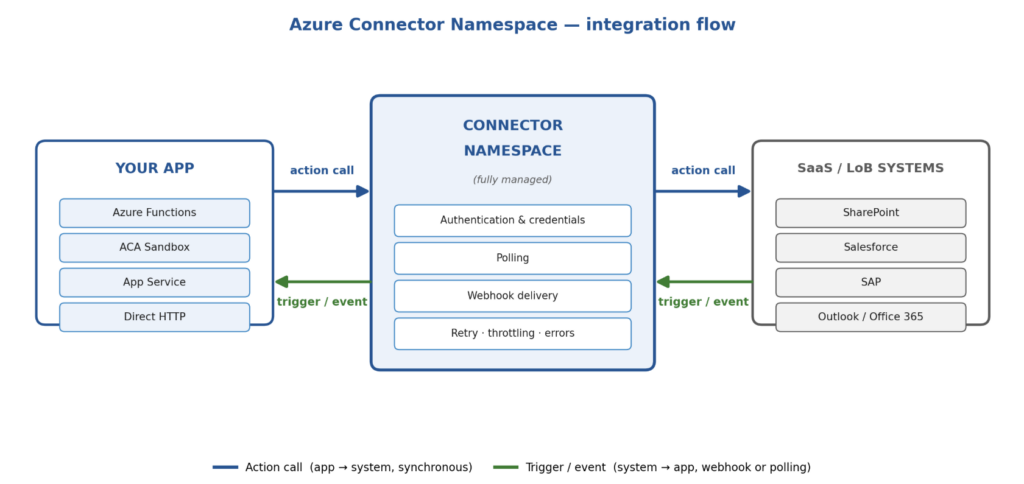
Connector Namespaces introduce a way to expose managed connectors as reusable integration capabilities that can be consumed from Azure compute services outside Logic Apps.
The first supported compute platform is Azure Functions through a public preview, but the architectural direction is much broader.
The What and Why
What are Connector Namespaces?
Connector Namespaces are effectively a new hosting model for Azure managed connectors. Instead of being tightly coupled to a Logic App workflow, connectors can now be provisioned and managed as Azure resources that can be consumed by supported compute platforms.
This means that the same managed connector experience that integration specialists know from Logic Apps can now be used by application developers building Azure Functions.
Why does this matter?
At first glance this may look like “just another connector announcement” and “Nothing exciting about it”. But it actually is a big thing!
Historically there has always been a distinction between:
- Integration-first solutions built with Logic Apps
- Code-first solutions built with Azure Functions
The moment a Function App needed to communicate with a third-party SaaS platform, developers often had to write and maintain integration code that already existed within the connector ecosystem or use existing Function triggers that were available. Connector Namespaces start removing that boundary.
Instead of every development team reinventing the wheel, they can consume standardized, Microsoft-managed integrations.
Some practical benefits include:
- Less custom code
- Less dependency on packages and SDKs
- Faster implementation
- Consistent authentication patterns
- Reduced maintenance effort
- Easier adoption of managed identity
- Reuse of the Azure connector ecosystem
- Option to run full workflow and function based integrations side-by-side while following the same architectural patterns.
For organizations that already heavily invested in Azure Integration Services, this also creates interesting opportunities to standardize connectivity across multiple Azure workloads.
Why I think integration specialists should pay attention
I’m excited about the strategic direction Microsoft is taking with this, For years, the connector ecosystem was largely viewed as a Logic Apps feature.
These announcements shows that Microsoft is evolving connectors into a platform capability. If Connector Namespaces continue expanding to additional Azure compute services, we could eventually see a unified integration layer available across Azure workloads.
That would significantly reduce the friction between application development and integration development teams.
How
At the time of writing, Azure Functions is the first publicly announced consumer of Connector Namespaces. The onboarding experience is intentionally straightforward.
Step 1: Create a Connector Namespace
Provision a Connector Namespace resource in Azure through the Azure Portal. This resource becomes the container for your managed connector integrations.
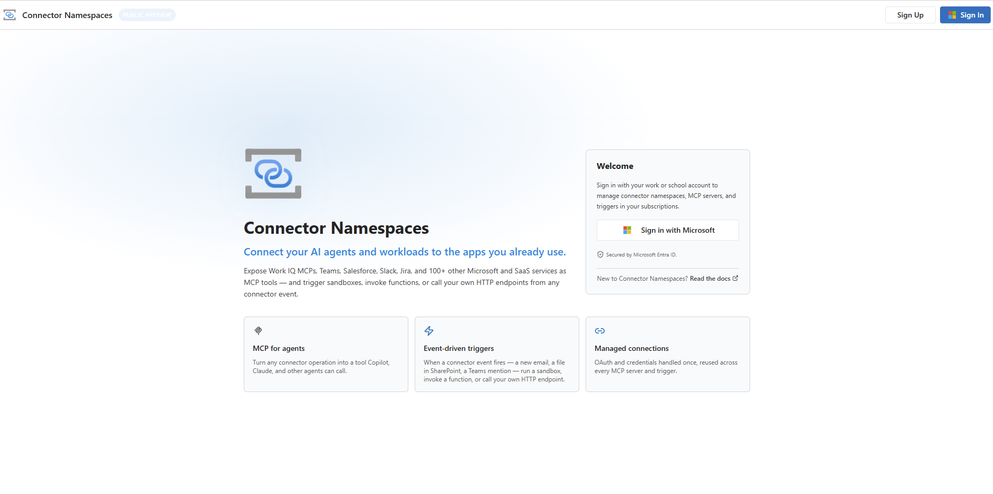
Connector namespaces can then be checked at: https://connectors.azure.com/
Step 2: Add a Managed Connector
Within the namespace, create the managed connector connection that you want to use.
Examples could include:
- Office 365
- Azure Service Bus
- SQL Server
- SharePoint
- Azure Key Vault
The experience is similar to creating a connection in Logic Apps.
Step 3: Configure Authentication
Use managed identities wherever possible.
This aligns with Microsoft’s recommended authentication strategy and avoids storing secrets or credentials. Managed identity support continues to be a core Azure authentication pattern.
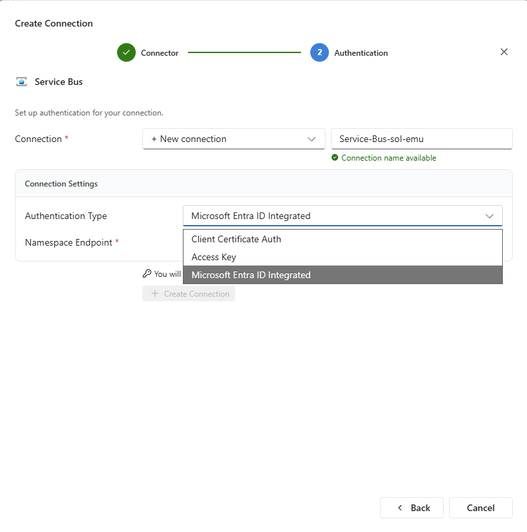
Step 4: Connect Azure Functions
Azure Functions can then consume the connector through the Connector Namespace abstraction rather than requiring direct SDK implementations.
One way to chieve that is just by going to the following github repo: Azure/Connectors-NET-SDK: A rich .NET SDK providing runtime components for typed Azure connector clients.
or via nuget: NuGet Gallery | Azure.Connectors.Sdk 0.12.0-preview.1
Step 5: Execute Operations
Your Function App can invoke connector operations while Microsoft continues managing the underlying connectivity infrastructure. This reduces the amount of plumbing code developers need to maintain.
Below is an example of how you can use the SDK to post a message to a Teams channel:
using Microsoft.Azure.Functions.Worker;
using Microsoft.Azure.Functions.Worker.Extensions.Connector;
using Azure.Connectors.Sdk.Office365.Models;
using Azure.Connectors.Sdk.Teams;
using Azure.Connectors.Sdk.Teams.Models;

public class ProcessEmail(TeamsClient teams)
{
    private readonly string _teamId    = Environment.GetEnvironmentVariable("TEAMS_TEAM_ID")!;
    private readonly string _channelId = Environment.GetEnvironmentVariable("TEAMS_CHANNEL_ID")!;

    [Function("OnNewEmail")]
    public async Task Run([ConnectorTrigger] Office365OnNewEmailTriggerPayload payload)
    {
        foreach (var email in payload.Body?.Value ?? [])
        {
            var message = new PostMessageRequest
            {
                Recipient    = new() { GroupId = _teamId, ChannelId = _channelId },
                MessageBody  = $"<b>📧 New email</b><br/><b>From:</b> {email.From}<br/><b>Subject:</b> {email.Subject}"
            };

            await teams.PostMessageToConversationAsync("Flow bot", "Channel", message);
        }
    }

    private sealed class PostMessageRequest : DynamicPostMessageRequest
    {
        public RecipientInfo Recipient   { get; set; } = new();
        public string        MessageBody { get; set; } = "";
    }

    private sealed class RecipientInfo
    {
        public string GroupId   { get; set; } = "";
        public string ChannelId { get; set; } = "";
    }
}
Conclusion
Connector Namespaces may look like a relatively small feature announcement, but I feel they represent something much more significant. Microsoft is now positioning managed connectors as a capability that extends beyond Logic Apps.
The immediate benefit is clear: Azure Functions developers gain access to a mature connector ecosystem without implementing everything from scratch. The long-term implication is even more interesting.
If Microsoft continues down this path, we may be witnessing the emergence of a unified integration layer that can be consumed across Azure compute services.
End Note
The Azure Functions support is currently in preview, so I would be cautious about immediately adopting it for mission-critical production workloads.
That said, I strongly recommend experimenting with Connector Namespaces in a sandbox environment.
Personally, I will be keeping a close eye on how Connector Namespaces evolve and which Azure compute services become supported next.
Leave a Reply