
This article was originally published on LinkedIn.
In June’s Logic Apps Aviators newsletter, Andrew Wilson was interviewed, and he was asked: “If you had a magic wand that could create a feature in Logic Apps, what would it be and why?”
His answer: “Wow, what an exciting question! If I had a magic wand, the first thing I’d add is having the option to throw exceptions that can be caught by try-catch scope blocks, this would bring much-needed clarity and flexibility to error handling. It’s a feature that would really help build more resilient and maintainable solutions.”
And indeed, it’s a feature that is currently missing and would be great to have. Fortunately, there is a rather creative and quick solution for that.
So wave your magic wand and read on!
Context
Logic App standard has the “Control” action, which enables developers to create scopes inside their workflows. I have been using these for quite some years now to build Try, Catch scopes in the following way. Each workflow has:
- a single Try scope to put business logic in.
- a single Catch scope, to provide a generic way to handle all exceptions in the workflow.
The Catch scope runs after the Try has either timed out or failed. So, if any action in the Try scope fails, the workflow will continue executing the Catch scope.
The Catch scope will do logic to handle the error, and the workflow will terminate gracefully. I will give some practices after explaining throwing an exception.

In most of the cases execution of the actions in the Try scope should stop, as soon as an error occurs. From coding perspective, you would throw an exception, and the Catch would handle it. Logic App does not have such action. And therefore, a custom solution is needed.
Solution
Let’s say you receive a Json message in your workflow, and it is being validated against a Json schema. If validation fails, there is no reason to continue processing the message. You would then move to the Catch scope of your workflow to handle the exception. The following picture illustrates this.

And in order to throw an exception at this point, I came up with the following creative solution, which makes the workflow move directly into the Catch scope.
- Use the Compose action.
- Als let this action cast a non-numeric string to an integer with the following input:
int('_ERROR_')

Voila… problem solved, and the workflow will move to the Catch scope right after.
Additional practices for the
Catch scope
As mentioned earlier, I like to be consistent in the setup of the workflows I design and create. Therefore, I believe that it is easier to let a workflow fail and handle exceptions in a generic and consistent manner.
What in most of the cases works for me, is the following pattern in the Catch scope:

- Filter errors. There can be quite some actions in the Try scope. Since we’re only interested in the actions that failed, I extract the failed actions with a query action.

- Remove the input data from the Json. I use this one to remove input information, so that we can log smaller error messages without input data to log analytics in the next step. This, again, happens with a query action.

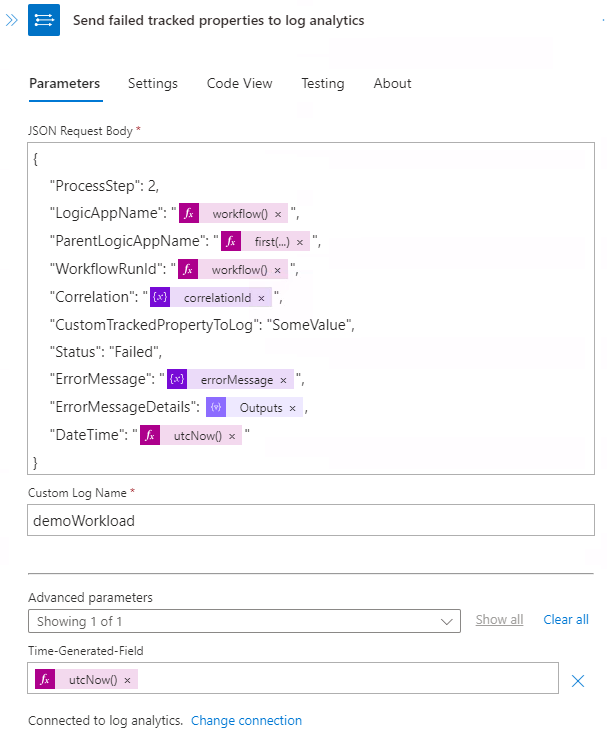
- Log the error (Log Analytics custom table). I do custom logging on each workflow for traceability purposes to a custom Log Analytics table specifically for the integration we’re building. This way we can easily track all “searchable” (tracked) properties and the status of each workflow (receive, process, send). This action does the regular “tracked properties” based on the input Json combined with custom logging.
- Dead letter the message that triggered the workflow (if applicable). Move the message being processed to the dead letter queue of Service Bus.
- Terminate the workflow run. And when all logging, dead lettering, etc has happened, the workflow run can terminate.

I hope that you – as a reader – now have some simple pointers to throw exceptions and handle them properly in Logic Apps!
Leave a Reply