Introduction
As organizations scale their use of Microsoft Azure, the number of deployed resources grows rapidly. Without structure and naming discipline, even a well-designed integration platform can quickly become difficult to manage.
In a Hybrid Integration Platform (HIP) built with Azure Integration Services, you typically work with a controlled and repeatable set of resources. Still, consistent naming and logical structuring are essential.
Over the past few years, I’ve refined a naming convention approach while implementing enterprise integration solutions which include:
- Logic Apps Standard
- Azure Functions
- Service Bus
- API Management
- Azure Data Factory
- Key Vault
- Storage Accounts
- Networking components
This article outlines the conventions that have proven effective in real-world projects. These conventions are not mandatory standards; they are based on practical experience and lessons learned across multiple implementations.
Why naming matters more in
Azure
A strong naming convention in Azure is not only cosmetic, it supports your architecture. It improves:
- Readability across teams
- Maintainability at scale
- Automation (IaC & DevOps pipelines)
- RBAC clarity
- Operational support
In cloud environments, naming becomes part of governance.
Architectural context
The integration architecture I typically use, follows a structured pattern inspired by traditional enterprise integration (similar to patterns used in on-premises integration platforms like BizTalk Server):
- Clear separation of receive, process/orchestrate, and send
- Decoupling via messaging
- Guaranteed delivery
- Resilience and reliability
- Support for multiple exchange patterns

Within this model:
- Some Azure resources are shared across integrations (platform-level)
- Others are integration-specific
- Cost considerations (e.g., Service Bus Premium namespaces) influence design


Naming only makes sense within that architectural context.
The core naming formula
All major Azure resources follow this structure:
<resource>-<org>-<workload>-<integration>-<optional-context>-<environment>
Segments explained
1) Resource. Abbreviation indicating the resource type (e.g., wf, sbns, kv, sa, nsg, etc.)
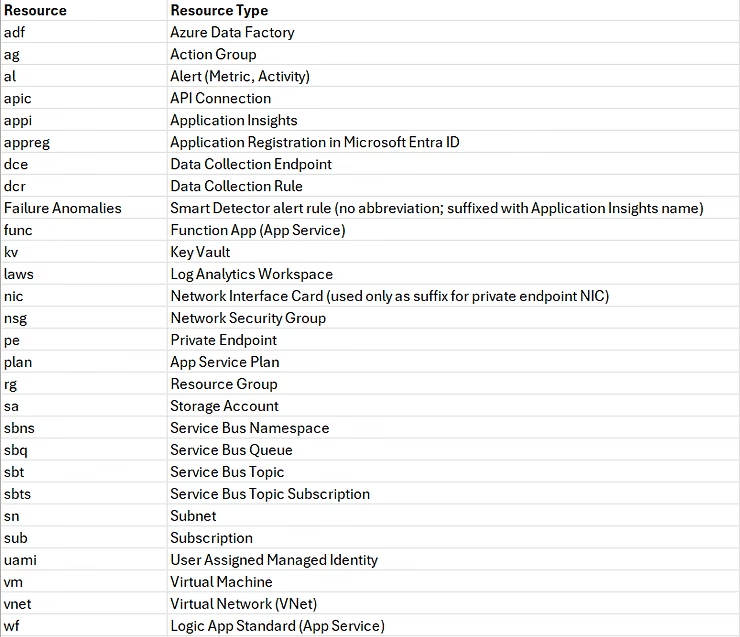
2) Organization. Organization abbreviation (max. 3 characters). Example: sah.
- Resource Groups use the full organization name (e.g. sahin)
- All other resources use the 3-character abbreviation (e.g. sah)
3) Workload. In my case:
- Full name: hybrid-integration-platform
- Short name: hip
But this might also be a division or department within an organization.
Subscriptions and Resource Groups use the full name. All other underlying resources use the short name.
4) Integration. The unique integration name.
Examples for integration names could be:
- biztalkbankstatements
- sharepointproject
- workdaytimesheet
- simcorpexchangerates
- profitemployees
The integration segment maps to three deployment tiers in the architecture:
- core — platform-wide resources that are shared across all workloads and integrations: Service Bus namespace and API Management. These are not tied to any workload, so the workload segment is omitted entirely and
coreis used as the integration segment. - shared — resources that are shared across all integrations within a workload: Logic App Standard hosting plan, shared Function App (it could also be part of an integration), shared Key Vault, Application Insights. These live in the shared resource group.
- <integration name> — resources dedicated to a single integration: the Logic App Standard instance, integration-specific Key Vault, Storage Account, alert rules, etc. Each integration gets its own resource group.
This three-tier split could be visible in both the Azure resource groups and in the repository structure or they could reside in their own repository: a core repository, and workload specific repositories that contain a shared folder, and one integrations folder with sub-folders for each integration.
5) Optional context. Provides additional clarification (e.g., backend, inbound, health, file, etc.)
6) Environment
- d = development
- t = test
- a = acceptance
- p = production
Segment usage summary
Not every resource uses every segment in the same way. Here is the complete breakdown:
| Resource type | Org segment | Workload segment |
|---|---|---|
| Subscriptions | Full name (e.g. sahin) | Full name (e.g. hybrid-integration-platform) |
| Resource Groups | Full name (e.g. sahin) | Full name (e.g. hybrid-integration-platform) |
| Virtual Network | Abbreviation (e.g. sah) | Abbreviation (e.g hip) |
| Private Endpoints | Abbreviation (e.g. sah) | Full name (e.g. hybrid-integration-platform) |
| Service Bus Namespace & APIM | Abbreviation (e.g. sah) | Omitted — these are core platform resources |
| All other resources | Abbreviation (e.g. sah) | Abbreviation (e.g. hip) |
Foundational naming rules
1) Lowercase only. Even when Azure allows uppercase, consistency wins.
2) Hyphen-separated segments. Improves readability and scanning.
⚠ Exception: Storage Accounts: Do not support hyphens. Therefore, it will use this approach:
sa<org abbr><workload abbr><integration-truncated-to-fit><environment>
Example:
sasahhipsomeintegrationt
Resource naming examples
Below are some examples from the platform.
Subscription
sub-<organization name>-<workload name>-<environment>
Example:
sub-sahin-hybrid-integration-platform-p
sub-nothwind-humanresources-p
Subscription name may subject to company standards. Most important to keep in mind that you should strive to have the full workload name and environment letter in there
Resource Group
Platform RG:  rg-<organization name>-core/network-<environment>
Workload RG:  rg-<organization name>-<workload name>-<integration>-<environment>
Examples:
rg-sahin-network-p
rg-sahin-core-p
rg-sahin-hybrid-integration-platform-shared-p
rg-sahin-hybrid-integration-platform-crmintegration-t
Virtual Network
vnet-<org abbr>-<workload abbr>-<environment>
Example:
vnet-sah-hip-a
vnet-sah-core-p
Subnet
sn-<org abbr>-<workload abbr>-<integration>-<optional: resource>-<type>-<environment>
=> where <type> indicates inbound, outbound, backend traffic directions.
Examples:
sn-sah-hip-shared-wf-outbound-t
sn-sah-hip-shared-backend-o
sn-sah-hip-core-servicebus-o
sn-sah-hip-<integration>-inbound-t
sn-sah-hip-<integration>-backend-a
Network Security Group (NSG)
nsg-<org abbr>-<workload abbr>-<integration>-<optional:resource>-<type>-<environment>
Examples:
nsg-sah-hip-shared-wf-outbound-t
nsg-sah-hip-shared-backend-o
nsg-sah-hip-<integration>-backend-a
NSG Security Rules
<action>-<source>-to-<destination>-<direction>-<protocol>-port-<port/range>
Examples:
allow-internet-to-vnet-inbound-tcp-port-80
deny-vnet-to-storage-outbound-tcp-port-445-447
deny-any-to-any-inbound-any-port-32268
Private Endpoint
pe-<resource>-<org abbr>-<workload abbr>-<integration>-<environment>
=> resource type comes first (right after pe-), then org abbreviation, then full workload name
Examples:
pe-kv-sah-hip-shared-p
pe-func-sah-hip-shared-p
pe-wf-sah-hip-<integration>-a
pe-namespace-sah-hip-core-p
Network Interface (auto-generated)
pe-<resource>-<org abbr>-<workload abbr>-<integration>-<environment>.nic.<guid>
=> auto-generated by Azure; follows the private endpoint name with a .nic.<guid> suffix
Example:
pe-kv-sah-hip-shared-p.nic.f8c06cd2-9f09-11ee-8c90-0242ac120002
App Service Plan
asp-<org abbr>-<workload abbr>-<integration>-<resource>-<environment>
Examples:
asp-sah-hip-shared-wf-t
asp-sah-hip-shared-func-o
In my case, these plans are shared over integrations and therefore deployed to a shared Resource Group
Supported types:
- wf (workflow – Logic App Standard)
- func (Function App)
- app (Web / API app)
Function App
func-<org abbr>-<workload abbr>-shared-<environment>
Example:
func-sah-hip-shared-a
I used a shared Function app and app service plan. You could also use Inline code for simple requirements with Logic Apps Standard or Inline Functions as part of your Logic Apps Standard or a Function app per integration to isolate or limit exposure of logic
Logic Apps Standard
wf-<org abbr>-<workload abbr>-<integration>-<environment>
Example:
wf-sah-hip-workdaytimesheet-p
The organization abbreviation (segment 2) provides the uniqueness needed for globally-scoped resources.
wf-sah-hip-crmaccounts-t
wf-sah-hip-shared-o
Workflow naming inside Logic Apps (Standard)
I strongly believe a workflow name should explain its purpose without documentation.
Receiver
rcv-<protocol>-<source>-<message>
Example:
rcv-https-unit4erp-invoices
=> receive invoices from unit4erp over https
Processor
prc-<target>-<message>
Example:
prc-isp-invoice
=> process invoice for isp system
Sender
snd-<protocol>-<target>-<message>
Example:
snd-https-crm-account
=> send account to crm over https
Helper
hlp-<protocol>-<system>-<description>
Example:
hlp-https-isp-retrieveaccesstoken
=> helper reachable via https that retrieves an access token for isp
Agent loop
agt-auto-<description>
or agt-conv-<description>
Example:
agt-auto-monitor-secrets
=> autonomous agent workflow that monitors secrets
Clear, predictable and self-documenting!
Artifacts inside Logic Apps Standard: Schemas
<system>.<messagetype>.<extension>
Examples:
unit4erp.invoices.json
simcorp.rates.json
crm.account.xml
Artifacts inside Logic Apps Standard: Maps
<source>.<messagetype>.to.<target>.<messagetype>.<extension>
Example:
timeway.timesheet.to.workday.timesheet.liquid
API Connection
apic-<org abbr>-<workload abbr>-<integration>-<resource>-<environment>
Example:
apic-sah-hip-simcorprates-laws-o
Display names follow lowercase descriptive naming principles
Service Bus
The Service Bus namespace is a platform-wide, core resource. It is shared across all integrations and all workloads. Because it belongs to no specific workload or integration, the workload segment is omitted from its name and core is used as the integration segment. The same principle applies to API Management.
Namespace (globally unique)
sbns-<org abbr>-core-<environment>
=> platform-wide resource; workload segment is omitted, core is the integration segment
Example: (globally unique — the organization abbreviation differentiates namespaces across tenants)
sbns-sah-core-p
Topic
sbt-<source>-out
Examples:
sbt-unit4erp-out
sbt-crm-out
sbt-afas-out
Subscription
sbts-<target>-<messagetype>
Examples:
sbts-sap-customer
sbts-salesforce-opportunity
Subscription filter rule
filter-<target>-<messagetype>
Examples:
filter-sap-customer
filter-salesforce-opportunity
Processing queue
Between receive and process workflows. Gets messages forwarded by subscription.
sbq-<target>-<messagetype>-<source>-prc
Examples:
sbq-sap-customer-dynamics-prc
sbq-salesforce-opportunity-crm-prc
Send queue
Between process and send workflows.
sbq-<target>-<messagetype>-in
Examples:
sbq-sap-customer-in
sbq-salesforce-opportunity-in
Azure Data Factory
Azure Data factory
adf-<org abbr>-<workload abbr>-<integration>-<environment>
Examples:
adf-sah-hip-shared-t
adf-sah-hip-someintegration-a
Shared Integration Runtime (SHIR)
adf-shir-<org abbr>-<workload abbr>-<integration>-<environment>
Example:
adf-shir-sah-hip-shared-o
Linked Service
adf_ls_<resource>_<subresource>_<description>_<environment>
Does not allow hyphens
Example:
adf_ls_sa_blob_somedepartment_o
Pipeline
adf-pl-<source>-<message>-to-<target>
Example:
adf-pl-crm-user-to-sqldb
Dataset
adf-ds-<datastore>-<format>-<message>
Example:
adf-ds-abs-json-accounts
Datastore abbreviation examples:
- afs (Azure File Share)
- abs (Azure Blob Storage)
- adb (Azure Database)
- ats (Azure Table Storage)
- ftp, sftp, etc
Dataflow
adf-df-<source>-<message>-to-<target>
Example:
adf-df-crm-accounts-to-sqldb
Key Vault
kv-<org abbr>-<workload abbr>-<integration>-<environment>
Examples:
kv-sah-hip-shared-t
kv-sah-hip-northwindshupsieflupsie-o
Key Vault names are limited to 24 characters and must be globally unique. If the integration name makes the name too long, shorten it. The organization abbreviation provides the global uniqueness needed.
Key Vault Secrets
<system>-<endpoint>-<proprty or context>
Examples:
unit4erp-api-username
profit-api-token
northwind-apim-clientid
pggm-apim-clientsecret
Storage Account & Claim-Check pattern
In my architecture, I apply the claim-check pattern using Service Bus. The message payload resides in Blob Storage. Only a reference goes through Service Bus.
There are two decoupling points:
- Between receiver and processor
- Between processor and sender
Blob naming:
<correlation id>_<rcv/prc>_<source/target>_<entity>_<datetime>.<ext>
Debatched message naming:
<correlation id>_<index>_<rcv>_<source>_<entity>_<datetime>.<ext>
This allows:
- Traceability
- Correlation across workflows
- Operational debugging
Monitoring & Observability
Metric & Activity log alerts
al-<org abbr>-<workload abbr>-<integration>-<resource>-<optional>-<environment>
Examples:
al-sah-hip-northwindshupsieflupsie-wf-health-t
al-sah-hip-crmaccounts-sa-actions-t
Application Insights
appi-<org abbr>-<workload abbr>-shared-<optional:resource>-<environment>
Example:
appi-sah-hip-shared-asp-a
Smart Detector Alert Rule
Failure Anomalies - appi-<org abbr>-<workload abbr>-shared-<optional:resource>-<environment>
Examples:
Failure Anomalies - appi-sah-hip-shared-asp-t
Failure Anomalies - appi-sah-hip-shared-asp-a
Action Group
ag-<org abbr>-<workload abbr>-<integration>-<optional-description>-<environment>
Example:
ag-sah-hip-shared-hip-p
Log Analytics Workspace
laws-<org abbr>-<workload abbr>-shared-<environment>
Example:
laws-sah-hip-shared-t
Final thoughts
I hope this article on naming conventions for Azure Integration Services will help others achieve more consistent resource naming.
I do need to mention that this version has been developed based on over two years of experience working with my current client. Prior to that, I used a different variant, which was specifically tailored to the needs of the client I was supporting at the time.
When establishing a naming convention, it is essential to strive for consistent segmentation, as well as improved readability and maintainability.
Nevertheless, I am personally satisfied with the version I have developed. I would be very interested to hear your thoughts as well.
Leave a Reply