

Introduction
Part 1 got the workspace gateway private. The main gateway still had a public front door. This is what it took to close that too, plus the part I honestly like least in this whole platform: there is no supported API to ever learn API Management’s own private IP address, so the pipeline finds it by guessing.
In part 1 I got Azure API Management v2 injected into a VNet, split into workspaces, and served through a workspace gateway running in Internal mode: private, VNet-only, no public IP. That covered the workspace gateway. It did not cover the service itself. The main gateway, the one every APIM instance ships with, the one *.azure-api.net actually resolves to, was still deployed with virtualNetworkType: 'External'. Publicly reachable, with VNet-routed outbound. Private inbound only existed on the side door I’d built.
That was a deliberate simplification for part 1, not an oversight. But it meant the platform still had a public listener sitting directly on the API Management service, independent of anything a network team could put in front of it.
For a hybrid integration platform meant to be the front door for internal traffic, that’s more public surface than it needs. So this iteration flips the main gateway to Internal too, and puts an Application Gateway with a WAF policy in front of the whole thing as the only resource in the VNet allowed to hear from the internet.
Everything past this point is what changed in the Bicep, and in the pipeline around it, to get from “the workspace gateway is private” to “nothing about this API Management instance is reachable from the internet except through a WAF I control.”
Changes in the solution:
- Main gateway: from external to Internal
- Public inbound on APIM: From Gatway to none
- Public entry point: Application Gateway (WAF_v2)
- New resources:
- Public IP
- WAF policy
- Application Gateway
How the fully isolated approach looks
One Application gateway, one WAF policy, one public IP.
Everything else in the core VNet, the main APIM gateway and every workspace gateway is Internal mode: injected into its own dedicated subnet, no public frontend, reachable only from inside the VNet, or, via peering, from the workload VNet where a Function App, Logic App Standard or Web app actually lives.
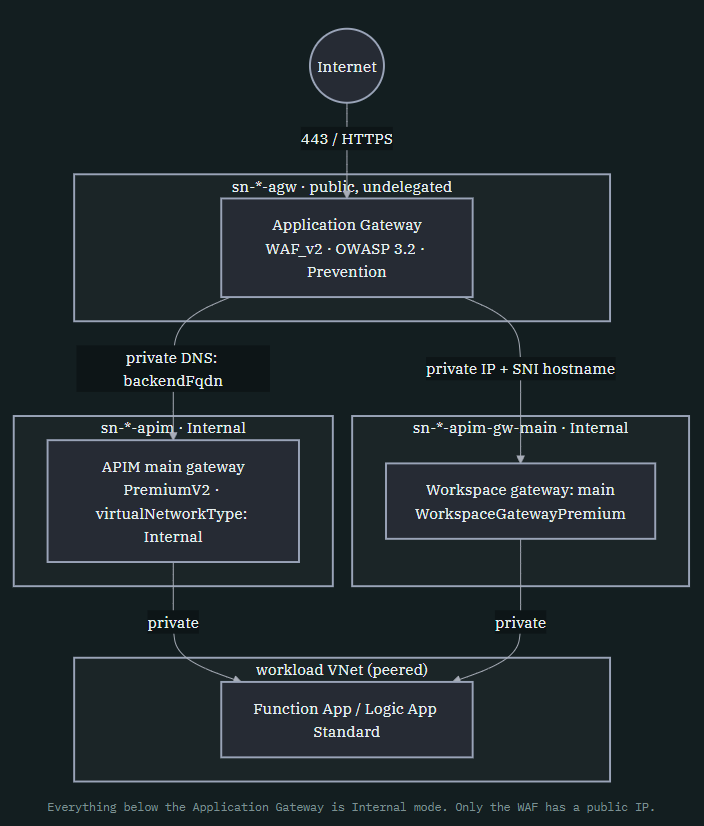
Two things had to happen for this to work, and they’re the two halves of the rest of this post. First, the main gateway’s subnet needed an NSG rule set nobody documents for Internal mode, because Internal-mode injection turns out to use the exact same internal-load-balancer model as a workspace gateway, rule for rule. Second, Application Gateway needed a backend hostname to route to, which meant solving DNS for a resource that has no supported way to report its own private IP address, and doing that from the pipeline, not from Bicep.
Flipping the main gateway to Internal
The good news first, this is the easy kind of change. There are two different transitions hiding behind “make APIM private,” and they are not the same cost.
- None to networked (adding VNet injection to an instance that didn’t have it) is create-time-only. Azure can’t retrofit injection onto a running instance, so that means a full recreate.
- External to Internal (flipping an already-injected instance’s public reachability) is an in-place property update. The subnet, the injection, the load balancer topology, none of that changes. Only whether the frontend accepts public traffic does.
Since part 1’s instance was already injected, this iteration only needed the second, cheaper transition. In the platform’s top-level entry point, that’s a single allowed-value parameter:
// "External" = gateway is publicly reachable from the internet with VNet outbound routing. "Internal" = gateway endpoint is private, only reachable from within the VNet.
@allowed(['External', 'Internal'])
param ApiManagementGatewayMainVirtualNetworkType string = 'External'
That one parameter drives both the main service gateway and the platform’s default workspace gateway (“main”), they’re deployed from the same value, so a single environment-level switch takes the whole instance private in one pass rather than needing two toggles kept in sync by hand. Deeper in platform.core.bicep, that resolves into the concrete network mode the API Management module actually receives:
// VNet injection (Internal mode), the only VNet mode this platform supports for the main gateway.
// Requires PremiumV2 and networking to be set. Create-time-only: Azure can't switch an existing
// instance in or out of injection, so changing this after first deploy means recreating the instance.
var isApiManagementNetworked = isApiManagementPremiumV2 && Configuration.?apiManagement.?networking != null

// ...
  // Resolved, concrete mode for the default/main gateway. isApiManagementNetworked already gates on
  // PremiumV2 + networking being set. Internal is the only VNet mode this platform supports for
  // the main gateway.
  networkMode: isApiManagementNetworked ? 'Internal' : 'None'
Notice what networkMode can actually be here, 'Internal' or 'None'. Not 'External'. I made a deliberate call to never let the main gateway deploy with a public frontend and VNet injection at the same time, if you want VNet injection at all through this platform, you get Internal. The ApiManagementGatewayMainVirtualNetworkType parameter above only ever governs the workspace gateways’ mode (main gateway included, since it shares that config), the service-level gateway itself is binary: injected and private, or not injected at all. That’s a narrower contract than raw ARM allows, chosen specifically to make “public APIM gateway” impossible to reach by accident through this platform.
// Resolved by the caller (platform.core.bicep): 'Internal' = full VNet injection of the main gateway
// (PremiumV2 only, no public path), the only mode this platform supports for it; 'None' = no VNet.
// Independent of workspace gateways, which are always VNet-injected regardless of this setting.
var virtualNetworkType = ApiManagementConfiguration.networkMode

resource apiManagement 'Microsoft.ApiManagement/service@2025-09-01-preview' = {
  name: ApiManagementConfiguration.name
  location: Location
  identity: { type: 'SystemAssigned' }
  sku: {
    name: ApiManagementConfiguration.sku
    capacity: 1
  }
  properties: {
    publisherName: ApiManagementConfiguration.publisherName
    publisherEmail: ApiManagementConfiguration.publisherEmail
    virtualNetworkType: virtualNetworkType
    virtualNetworkConfiguration: virtualNetworkType != 'None'
      ? { subnetResourceId: subnetResourceId }
      : null
  }
}
The NSG rule set nobody tells you an internal main gateway needs
This is the part that actually cost time. Part 1 already worked out the workspace gateway’s NSG rules from scratch, GatewayManager and ApiManagement inbound, because v1’s port-3443 guidance doesn’t apply to v2. What I didn’t expect: once the main gateway also goes Internal, its subnet needs almost the identical rule set, not the leaner one you’d assume from External-mode documentation, which mostly talks about outbound rules, because inbound used to just be “the internet.”
The reason, once you sit with it, is obvious. Internal mode is not “External mode minus a public IP.” It’s a completely different frontend, an internal load balancer, and that ILB has the same lifecycle-management and health-probe dependencies any Azure-managed internal load balancer has, regardless of which product sits behind it. A workspace gateway and an Internal-mode main service gateway are, from the subnet’s perspective, the same kind of object.
| Rule | Direction | Port | Source | Destination | Why |
|---|---|---|---|---|---|
| allow-gatewaymanager-inbound-tcp-443 | In | 443 | GatewayManager | * | Required. Azure Gateway Manager talks to the injected instance for provisioning, health, and updates, the rule the old v1/port-3443 docs don’t mention because it didn’t exist in that form. |
| allow-vnet-inbound-tcp-443 | In | 443 | VirtualNetwork | VirtualNetwork | VNet clients (Logic Apps, Function App, and now Application Gateway) reaching the gateway over HTTPS. |
| allow-azureloadbalancer-inbound-tcp-65200-65535 | In | 65200–65535 | AzureLoadBalancer | VirtualNetwork | Required. Azure’s infrastructure health probe for the ILB fronting Internal mode. Miss this and health checks fail silently, with nothing pointing back at the NSG. |
| allow-vnet-outbound-tcp-443 | Out | 443 | VirtualNetwork | VirtualNetwork | Backend calls and Logic App trigger endpoints. |
| allow-storage-outbound-tcp-443 | Out | 443 | VirtualNetwork | Storage | Required. Injected APIM instances depend on Azure Storage for internal state. |
| allow-keyvault-outbound-tcp-443 | Out | 443 | VirtualNetwork | AzureKeyVault | Required. Named-value Key Vault references and instance dependencies. |
| allow-azureactivedirectory-outbound-tcp-443 | Out | 443 | VirtualNetwork | AzureActiveDirectory | OAuth2 token validation and managed-identity flows against Entra ID. |
| allow-apimanagement-outbound-tcp-443 | Out | 443 | VirtualNetwork | ApiManagement | Reaching the APIM management plane during activation and runtime. |
Note:

Every reference I could find on NSG requirements for VNet-injected APIM v2 frames the rules around External mode, where inbound is mostly "the internet, obviously" and the interesting rules are outbound. None of them carry over the workspace-gateway-style inbound set once you flip to Internal. If your Internal-mode main gateway sits there provisioned but never turns healthy, and everything about the deployment otherwise looks correct, check the AzureLoadBalancer and GatewayManager inbound rules on its subnet before anything else.
In the Bicep, this subnet only gets materialized when injection is active, and its rule list is close to line-for-line what part 1 already wrote for workspace gateways:
// API Management v2 VNet-injection subnet (Internal mode) for the default/main gateway.
// Delegated to Microsoft.Web/hostingEnvironments, the same delegation workspace gateway subnets
// use, since injection uses the same internal-load-balancer model. Dedicated subnet: can't be
// shared with any other resource.
var apiManagementSubnets = isApiManagementNetworked ? [
  {
    direction: 'apim'
    name: subnetApiManagementName
    addressSpace: Configuration.apiManagement!.networking!.addressSpace
    delegations: [
      {
        name: 'Microsoft.Web.hostingEnvironments'
        properties: { serviceName: 'Microsoft.Web/hostingEnvironments' }
      }
    ]
    networkSecurityGroup: {
      rules: [
        { name: 'allow-gatewaymanager-inbound-tcp-port-443', direction: 'Inbound', protocol: 'Tcp'
          sourceAddressPrefix: 'GatewayManager', destinationAddressPrefix: '*', destinationPortRange: '443', priority: 1000, access: 'Allow' }
        { name: 'allow-vnet-inbound-tcp-port-443', direction: 'Inbound', protocol: 'Tcp'
          sourceAddressPrefix: 'VirtualNetwork', destinationAddressPrefix: 'VirtualNetwork', destinationPortRange: '443', priority: 1100, access: 'Allow' }
        { name: 'allow-azureloadbalancer-inbound-tcp-port-65200-65535', direction: 'Inbound', protocol: 'Tcp'
          sourceAddressPrefix: 'AzureLoadBalancer', destinationAddressPrefix: 'VirtualNetwork', destinationPortRange: '65200-65535', priority: 1200, access: 'Allow' }
        // ... outbound rules: vnet:443, Storage:443, AzureKeyVault:443, AzureActiveDirectory:443, ApiManagement:443
      ]
    }
  }
] : []
Subnet delegation is Microsoft.Web/hostingEnvironments, the same delegation part 1 used for the workspace gateway subnet, not Microsoft.ApiManagement/service as the resource type name would suggest. That detail doesn’t change between External and Internal, it’s fixed by the injection model itself.
Application Gateway: the only public door left
With the main gateway’s public frontend gone, something in the VNet has to answer for the internet, terminate TLS, apply a WAF, and forward to APIM privately. That’s Microsoft.Network/applicationGateways on the WAF_v2 tier, in its own dedicated (undelegated) subnet, sized /27 minimum per Azure’s Application Gateway v2 requirements.
Note:

Inline WAF configuration on the Application Gateway resource, the webApplicationFirewallConfiguration property you'll find in a lot of older samples, is retired (ApplicationGatewayWafConfigurationDeprecated). A WAF policy is now a standalone resource, associated back to the gateway through a firewallPolicy reference. If a template you're copying from still sets that property inline, expect the deployment to reject it outright.
resource wafPolicy 'Microsoft.Network/ApplicationGatewayWebApplicationFirewallPolicies@2025-07-01' = {
  name: '${applicationGatewayName}-waf-policy'
  location: Location
  properties: {
    managedRules: {
      managedRuleSets: [
        { ruleSetType: 'OWASP', ruleSetVersion: '3.2' }
      ]
    }
    policySettings: {
      mode: 'Prevention'
      state: 'Enabled'
    }
  }
}

resource applicationGateway 'Microsoft.Network/applicationGateways@2025-05-01' = {
  name: applicationGatewayName
  properties: {
    sku: { name: 'WAF_v2', tier: 'WAF_v2' }
    autoscaleConfiguration: {
      minCapacity: ApplicationGatewayConfiguration.?minCapacity ?? 0
      maxCapacity: ApplicationGatewayConfiguration.?maxCapacity ?? 2
    }
    firewallPolicy: { id: wafPolicy.id }
    // gatewayIPConfigurations, frontendIPConfigurations, frontendPorts, backendAddressPools,
    // probes, backendHttpSettingsCollection, sslCertificates, httpListeners, requestRoutingRules...
  }
}
Prevention mode, OWASP 3.2 managed rules, autoscale from zero by default, this is a platform default meant to be safe to leave running in a dev or test environment without burning capacity, not a production-tuned policy. The backend pool for the main routing rule targets APIM by FQDN, not IP:
// Routes public traffic to the Internal-mode APIM gateway, which has no public path of its own. The
// backend hostname only resolves once the post-deploy DNS script upserts the A record; ARM accepts an
// unresolved FQDN at deploy time, so the Application Gateway resource itself deploys fine regardless.
var applicationGatewayConfiguration = {
  backendFqdn: '${apiManagementName}.azure-api.net'
  workspaceGatewayBackends: apiManagement.?outputs.?workspaceGatewayBackends ?? []
  // ...
}
That comment is doing a lot of work. An Application Gateway backend pointed at an FQDN doesn’t need that FQDN to resolve at deploy time, only at request time. Which matters, because the DNS record it depends on doesn’t exist yet when this resource first goes down. That gap is the whole subject of section “DNS for a resource with no discovery API”.
The health probe uses APIM’s own gateway status endpoint, available on every tier above Consumption:
{
  name: healthProbeName
  properties: {
    protocol: 'Https'
    host: ApplicationGatewayConfiguration.backendFqdn
    // Returns 200 OK with an empty body when the gateway itself is reachable and healthy;
    // doesn't test any published backend APIs. Also usable as a manual curl smoke test post-deploy.
    path: '/status-0123456789abcdef'
    interval: 30
    timeout: 30
    unhealthyThreshold: 3
  }
}
The gateway subnet’s own NSG is smaller than APIM’s, because Application Gateway v2 has different infrastructure dependencies: GatewayManager inbound on 65200-65535 instead of 443, AzureLoadBalancer inbound on any port, then the actual traffic rules, Internet → 443 inbound, VirtualNetwork → 443 outbound to reach APIM.
Routing to workspace gateways through the same front door
The main gateway backend pool above is straightforward, one FQDN, one pool. Workspace gateways are a different shape entirely: each one has its own private IP and its own auto-issued hostname, and the platform wires them into the same Application Gateway automatically, with no manual input, by reading them straight off the API Management module’s output.
This is also where I can answer something worth being precise about: the private IP dance in this post is only necessary for the main service gateway. Workspace gateways don’t need any of it. Their VIP is exposed directly on the ARM resource, no script, no probing, nothing:
// Unlike the main service, a workspace gateway's private VIP is exposed via ARM
// (properties.frontend.inboundIPAddresses.private) and its real runtime hostname via each
// configConnections child's properties.defaultHostname. Neither property is in Bicep's bundled
// type definitions for this preview resource, but both are confirmed live.
output workspaceGatewayBackends array = [
  for i in range(0, length(ApiManagementConfiguration.gateways)): {
    name: ApiManagementConfiguration.gateways[i].name
    #disable-next-line BCP053
    privateIpAddress: workspaceGateways[i].properties.frontend.inboundIPAddresses.private[0]
    hostname: /* first configConnection's defaultHostname for this gateway */ '...'
  }
]
That’s it. Straight ARM property read, resolved at deploy time, in the same Bicep deployment that creates the gateway. No pipeline step, no PowerShell, no guessing. It’s only the main API Management service gateway that’s the odd one out, and that’s the whole reason section “DNS for a resource with no discovery API” exists.
Application Gateway then builds one frontend port, one backend pool (by IP, not FQDN, no DNS zone needed for these), one health probe, one backend-HTTP-settings entry, one listener, and one Basic routing rule per workspace gateway, in a loop:
var workspaceGatewayFrontendPorts = [
  for (backend, i) in workspaceGatewayBackends: {
    name: 'port-workspace-gw-${backend.name}'
    properties: { port: 8443 + i }
  }
]

var workspaceGatewayBackendPools = [
  for (backend, i) in workspaceGatewayBackends: {
    name: 'workspace-gw-${backend.name}-backend-pool'
    properties: {
      backendAddresses: [ { ipAddress: backend.privateIpAddress } ]
    }
  }
]

var workspaceGatewayBackendHttpSettingsCollection = [
  for (backend, i) in workspaceGatewayBackends: {
    name: 'workspace-gw-${backend.name}-backend-http-settings'
    properties: {
      port: 443
      protocol: 'Https'
      pickHostNameFromBackendAddress: false
      hostName: backend.hostname
      probe: { id: resourceId('Microsoft.Network/applicationGateways/probes', applicationGatewayName, 'workspace-gw-${backend.name}-health-probe') }
    }
  }
]
Note:

Addressing a backend by private IP does not get you out of hostname matching. Confirmed live: pointing backendAddresses at a workspace gateway's private IP with a mismatched or absent hostName on the backend HTTP settings fails the TLS handshake with "Common Name of the leaf certificate… does not match." Application Gateway still validates the backend's certificate CN/SAN against the hostname it's told to expect, it just doesn't get that hostname from DNS resolution the way it would with an FQDN backend, so you have to supply it explicitly. That's exactly why workspaceGatewayBackends carries a hostname field alongside the IP, sourced straight from each gateway's configConnections child resource, no extra lookup needed.
Each workspace gateway backend also gets its own port starting at 8443, because a single Application Gateway listener can only bind one backend per (frontend IP, port, protocol) combination, and the main gateway already owns 443, so workspace gateways stack upward from there. Multiple workspaces sharing one gateway, the part 1 caveat about needing URL infixes, is unaffected by any of this. That’s still resolved at the APIM routing layer, not here.
DNS for a resource with no discovery API
This is the section I’d put above every other gotcha in this post, NSG rules included. Application Gateway’s main backend pool targets {name}.azure-api.net by FQDN. That FQDN has to resolve, privately, to APIM’s Internal-mode VIP. Three problems stack on top of each other here, and the third one is the reason a chunk of this “Bicep” post is actually about a pipeline.
Problem one: it’s not a privatelink.* zone
Every other private-endpoint-backed resource in this platform, Key Vault, Storage, Service Bus, App Service, resolves through a shared privatelink.<suffix> zone, because Azure Private Link uses a predictable CNAME-shimming pattern for the whole service family. VNet injection isn’t Private Link, and APIM explicitly warns against creating a zone for the bare azure-api.net apex, that would hijack DNS resolution for every APIM instance in the tenant using that suffix, not just yours. Instead the zone has to be scoped to the exact instance hostname, with the record sitting at the zone apex (@):
// Not a "privatelink.*" shared-suffix zone like the others: Microsoft explicitly warns against a
// zone for the "azure-api.net" apex domain, and instead requires a zone scoped to the exact
// instance FQDN, with the record at the zone apex ("@").
var privateDnsZoneNameApiManagement = '${apiManagementName}.azure-api.net'

module privateDnsZoneApiManagement 'modules/private.dns.zone.bicep' = {
  scope: resourceGroup(coreSubscriptionId, coreNetworkResourceGroupName)
  params: { PrivateDnsZoneName: privateDnsZoneNameApiManagement }
}
// ... linked to both the core VNet and the workload VNet, since Logic Apps/Function App
// there call the injected gateway as their audience too.
Problem two: nothing can tell you the IP to put in that record
Private endpoints get their A record written automatically. VNet injection doesn’t, there is no equivalent integration. So something has to write it. That requires knowing the VIP. This is where it gets genuinely strange: there is no supported way to read it.
Note: Undocumented, and I mean actually undocumented

Confirmed against a live deployment: Azure CLI, raw ARM/REST calls against the service resource, Azure Resource Graph, the Portal's own UI, and Network Watcher all come back empty for the Internal-mode main gateway's private IP. The internal load balancer backing the injection lives in a Microsoft-managed subscription that isn't visible through any customer-facing API. If you've gone looking for a properties.something.privateIPAddress on the service resource the way you'd expect from any other injected PaaS service, it doesn't exist here. As covered in section "Routing to workspace gateways through the same front door", workspace gateways are the one exception, their VIP is exposed on the resource itself. The main service gateway is the one that hides it.
Problem three: this can’t live inside the Bicep deployment at all
Even if you accept “probe for it,” ARM has no primitive for “try a value, check a side effect, retry.” No loops with external state, no conditionals on live health data. So the discovery has to happen outside the deployment, as an imperative script, after the resources it depends on already exist. Concretely: after the main Bicep deployment finishes (so the injected instance and Application Gateway both exist), as its own separate pipeline step.
Here’s the actual pipeline, trimmed to the parts that matter:
steps:
  - task: PowerShell@2
    displayName: "Validate APIM Internal + Application Gateway prerequisites"
    inputs:
      filePath: ".../devops/pipelines/scripts/validate.apim.applicationgateway.prerequisites.ps1"
      arguments: >-
        -ApiManagementInternalSubnetAddressSpace "$(hip_subnet_core_apimanagement_internal)"
        -ApplicationGatewaySubnetAddressSpace "$(hip_subnet_core_applicationgateway)"
        -ApplicationGatewaySslCertificateData "$(hip_apimanagement_agw_ssl_certificate_data)"
        -ApplicationGatewaySslCertificatePassword "$(hip_apimanagement_agw_ssl_certificate_password)"
        -ApiManagementSku "$(hip_apimanagement_sku)"

  // ... token replace, resource group create ...

  - task: AzureCLI@2
    displayName: "Deploy platform core resources"
    inputs:
      scriptPath: ".../devops/pipelines/scripts/az.deployment.group.create.ps1"
      arguments: >-
        -TemplateFile ".../core/deployment/templates/platform.core.resources.bicep"
        -ParametersFile ".../core/deployment/parameters/platform.core.resources.parameters.bicepparam"

  // VNet injection has no automatic DNS registration, and the private VIP has no supported API to
  // read. Auto-discovers it by probing candidate addresses against Application Gateway's backend
  // health, so this requires the Application Gateway subnet to be set.
  - task: AzurePowerShell@5
    displayName: "Set API Management internal DNS record"
    condition: and(succeeded(),
      ne(variables['hip_subnet_core_apimanagement_internal'], ''),
      ne(variables['hip_subnet_core_applicationgateway'], ''))
    inputs:
      ScriptPath: ".../devops/pipelines/scripts/set.apim.internal.dns.record.ps1"
      ScriptArguments: >-
        -ApiManagementName "apim-$(hip_organization_shortname)-core-$(hip_do_environmentletter)"
        -PrivateDnsZoneName "apim-$(hip_organization_shortname)-core-$(hip_do_environmentletter).azure-api.net"
        -VirtualNetworkName "vnet-$(hip_organization_shortname)-core-$(hip_do_environmentletter)"
        -SubnetName "sn-$(hip_organization_shortname)-core-apim-$(hip_do_environmentletter)"
        -ApplicationGatewayName "agw-$(hip_organization_shortname)-core-$(hip_do_environmentletter)"
        -ApplicationGatewayResourceGroupName "rg-$(hip_organization_name)-core-$(hip_do_environmentletter)"
Four things worth calling out in that ordering:
- Validation runs before the resource group even gets created, not just before the Bicep deployment.
- The main Bicep deployment (subnets, NSGs, APIM, workspace gateways, Application Gateway, WAF policy, all of it) runs to completion as one step, unaware that DNS is still unresolved.
- The DNS script runs as its own, separate, later step, using
AzurePowerShell@5rather thanAzureCLI@2, because it needs theAzPowerShell cmdlets for private DNS record sets and Application Gateway backend health, not raw CLI calls. - That step is conditioned on both the internal subnet and the Application Gateway subnet variables being set, so environments that don’t opt into either of them skip it entirely rather than failing on missing resources.
The validation step is the one I didn’t cover in the first draft of this post, and it’s worth explaining exactly what it’s protecting against, because the reason is a genuinely nasty one to hit blind:
# Validates that the API Management Internal VNet injection + Application Gateway configuration is
# internally consistent before any resource group or deployment is attempted. Failing here is cheap;
# failing after a real deployment attempt can burn a PremiumV2 activation attempt against Azure's
# 60-minute per-subscription throttle for a combination that was never going to work anyway.

if ($isApimInternalEnabled -and $ApiManagementSku -ne "PremiumV2") {
    Write-Host "##[error] Internal VNet injection is only supported on PremiumV2."
    exit 1
}

if ($isApimInternalEnabled -and -not $isApplicationGatewayEnabled) {
    Write-Host "##[error] The API Management internal subnet is set, but the Application Gateway subnet is empty."
    Write-Host "##[error] The APIM private VIP cannot be discovered through ARM APIs; this deployment uses
    Application Gateway backend health probing to discover and set the private DNS A record. Without
    Application Gateway, there is no way to configure DNS for the injected instance."
    exit 1
}

if ($isApplicationGatewayEnabled -and -not $hasCertificateData) {
    Write-Host "##[error] The Application Gateway subnet is set, but the SSL certificate data is empty."
    exit 1
}
That comment about a “60-minute per-subscription throttle” is the real reason this validation exists as a hard gate rather than a warning. PremiumV2 activation is slow and rate-limited per subscription, so a deployment that was always going to fail because you set the internal subnet without an Application Gateway, or picked StandardV2 with injection turned on, doesn’t get to fail expensively after eating that throttle window. It fails in seconds, before the resource group exists at all. I added this after burning exactly one of those windows on a config I could have caught with a five-line check.
Once validation passes and the main deployment is done, set.apim.internal.dns.record.ps1 is what actually finds the address. I covered the mechanics in the first version of this section, worth restating here since it’s the payoff of everything above it. Azure documents the address allocation for injection, five reserved addresses, two per scale unit, one for the load balancer, which means the VIP is reliably one of the first few usable addresses in the subnet. The script walks candidates starting at .4, writes each as the DNS record, waits, and asks Application Gateway’s backend health check whether it went healthy:
# Azure reserves the first 4 addresses (network, gateway, 2x DNS) and the last (broadcast) in every
# subnet. Candidates start at .4, immediately after that reserved block.
$candidateStart = $baseAsInt + 4
$candidates = 0..($MaxCandidates - 1) | ForEach-Object { ConvertTo-IpString -IntValue ($candidateStart + $_) }

# Fast path: if a record already exists and is already healthy, don't touch anything.
if ($existingRecordSet -and (Test-ApimBackendHealthy)) {
    Write-Host "Existing record is still healthy. No change needed."
    exit 0
}

foreach ($candidate in $candidates) {
    Set-ApimDnsRecord -IpAddress $candidate
    Start-Sleep -Seconds $WaitSecondsPerCandidate
    if (Test-ApimBackendHealthy) {
        Write-Host "Found it: $candidate is healthy. A record upsert complete."
        exit 0
    }
}
Application Gateway becomes the oracle, and DNS gets solved by exhaustive search over a search space small enough, documented at three addresses per instance, twenty tried for headroom, that it finishes in minutes rather than hours. It’s idempotent by design, the fast path re-verifies the existing record’s health before touching anything, since the VIP can genuinely change if the injection subnet is ever recreated, and it fails loudly rather than guessing: no Application Gateway in the environment, no probe, no attempt. That last part is also exactly what the validation script upstream is protecting: it makes sure you can never even reach this step without an Application Gateway to probe against.
I want to be direct about this one. I don’t love shipping “guess IP addresses and health-check your way to the right one” as a DNS strategy for anything. It’s a workaround for an actual product gap, not a pattern I’d reach for by choice. But it’s the only thing that worked against a live instance, and it’s fully contained to one script, gated by one validation check, running once per deployment. If Microsoft ever exposes the VIP through a supported API, this whole section gets deleted.
Certificates: params, not Key Vault
The listener’s TLS certificate is accepted as base64 PFX data and a password, passed as separate @secure() parameters rather than fields on the Application Gateway configuration object:
// Separate secure params: Bicep can't mark object properties as secure, so embedding these in
// ApplicationGatewayConfiguration would lose ARM's deployment-history redaction.
@secure()
param SslCertificateData string

@secure()
param SslCertificatePassword string

resource applicationGateway 'Microsoft.Network/applicationGateways@2025-05-01' = {
  properties: {
    sslCertificates: [
      { name: sslCertificateName, properties: { data: SslCertificateData, password: SslCertificatePassword } }
    ]
    // ...
  }
}
Two deliberate choices stacked here. First, Bicep can’t mark a single property of an object parameter as secure, only whole top-level parameters, so if the cert data lived inside the shared applicationGateway configuration object it would lose ARM’s deployment-history redaction entirely. Second, this resource reads the certificate bytes directly instead of a Key Vault reference, specifically so Application Gateway doesn’t become a new reason for the core tier to need its own Key Vault, managed identity, and RBAC wiring. Provisioning the actual certificate, self-signed for dev, a real one for anything else, stays a manual prerequisite outside this deployment.
The workspace-gateway listeners from section “Routing to workspace gateways through the same front door” reuse this same certificate rather than getting their own. That’s fine precisely because that TLS handshake is Application Gateway to workspace gateway, backend-only, it’s already been proven against the client-facing hostname on port 443, and the backend leg’s CN requirement is satisfied by the hostName override discussed earlier, not by the listener certificate’s own CN.
Wiring order inside the Bicep
Subnets for API Management, Application Gateway, Service Bus, and every workspace gateway are all built from one concatenated list and deployed through the same loop, one at a time:
var subnetsConfiguration = concat(serviceBusSubnets, apiManagementSubnets, applicationGatewaySubnets, workspaceGatewaySubnets)

// Deploy subnets sequentially to avoid parallel subnet writes against the same VNet.
// The network RP can otherwise return AnotherOperationInProgress on dependent subnet operations.
@batchSize(1)
module subnet 'modules/subnet.bicep' = [
  for (subnetConfiguration, index) in subnetsConfiguration: {
    scope: resourceGroup(subscription().subscriptionId, resourceGroupNetworkName)
    dependsOn: [virtualNetwork]
    params: { /* ... */ }
  }
]
@batchSize(1) shows up three times across this platform for the same underlying reason. The Network RP throws AnotherOperationInProgress on concurrent subnet writes against one VNet, APIM rejects concurrent workspace writes against one service, and a workspace gateway rejects concurrent configConnections writes against itself. None of these are documented as hard concurrency limits anywhere obvious, they surface as opaque deployment failures the first time you let Bicep’s default parallelism loose on them.
Application Gateway depends on the subnet module explicitly, but not on the API Management module directly, its dependency on APIM’s backend FQDN and workspaceGatewayBackends output is implicit, carried through the values referenced inside applicationGatewayConfiguration, which is enough for ARM to sequence it correctly without an extra explicit edge.
Before / after
| Part 1 | Part 2 | |
|---|---|---|
Main gateway virtualNetworkType | External | Internal |
| Public inbound on APIM itself | Yes, on the main gateway | None |
| Workspace gateway | Internal | Internal (unchanged) |
| Public entry point | APIM’s own gateway | Application Gateway (WAF_v2) |
| New Azure resources | None | Public IP, WAF policy, Application Gateway |
| New subnet | None | sn-*-agw, undelegated, /27 min |
| TLS certificate | Not needed | PFX bytes as secure params |
| Main gateway DNS | Public DNS (Azure-managed) | Private zone, apex record, VIP found by pipeline candidate sweep |
| Pipeline steps | 1 (deploy) | 3 (validate, deploy, set DNS) |
Round two of takeaways
- External to Internal is cheap, None to networked is not. If you’re already injected, flipping public reachability off is an in-place property update. Enabling injection in the first place, on an instance that didn’t have it, means a recreate. Know which transition you’re actually making before you plan a maintenance window.
- Internal mode reuses the workspace-gateway NSG shape, not the External-mode one.
GatewayManagerinbound on 443 andAzureLoadBalancerinbound on 65200 to 65535 apply to the main gateway’s subnet the moment it goes Internal, exactly as they do for a workspace gateway. Most guidance you’ll find assumes External and only talks about outbound. - Inline WAF config is gone. Always a standalone
ApplicationGatewayWebApplicationFirewallPoliciesresource, referenced viafirewallPolicy. - Backend hostname matching applies even when you address by private IP. Application Gateway still validates the backend certificate’s CN/SAN against a hostname you have to supply explicitly, DNS resolution isn’t what’s providing it in this path.
- There is no supported API for the main gateway’s injected VIP. Not CLI, not REST, not Resource Graph, not the Portal, not Network Watcher. Workspace gateways are the exception, their VIP is a plain ARM property. If you need the main gateway’s VIP, you need a prober already inside the VNet, Application Gateway’s backend health check is the only one this platform has.
- That discovery step can’t live in Bicep. ARM has no loop-and-probe primitive, so it has to run as an imperative pipeline step, after the main deployment, gated on Application Gateway actually existing.
- Validate the combination before you spend a PremiumV2 activation attempt on it. Internal without an Application Gateway, or injection on a non-PremiumV2 SKU, are both dead ends that are cheap to catch before the resource group exists and expensive to discover after, against Azure’s 60-minute per-subscription PremiumV2 throttle.
- The DNS zone is shaped like the exact instance FQDN, apex record, not a
privatelink.*suffix zone. Creating a zone for bareazure-api.netwould hijack resolution tenant-wide for that suffix. - Keep certificate material as top-level secure params, never as fields on a shared configuration object. Bicep can’t mark individual object properties secure, so nesting them loses ARM’s deployment-history redaction.
Conclusion
That’s what it took to get from “the workspace gateway is private” to “nothing about this instance answers the internet except a WAF I put there on purpose.” Section “DNS for a resource with no discovery API” is the one I’d most like Microsoft to make obsolete. If the injected VIP ever becomes readable through a supported API, that script gets deleted, not rewritten, and this post gets a paragraph added instead of a page.
Anyhow, I want to close the post with some real footage of the changes I made and the resources after deployment and link to GitHub for a full working solution.

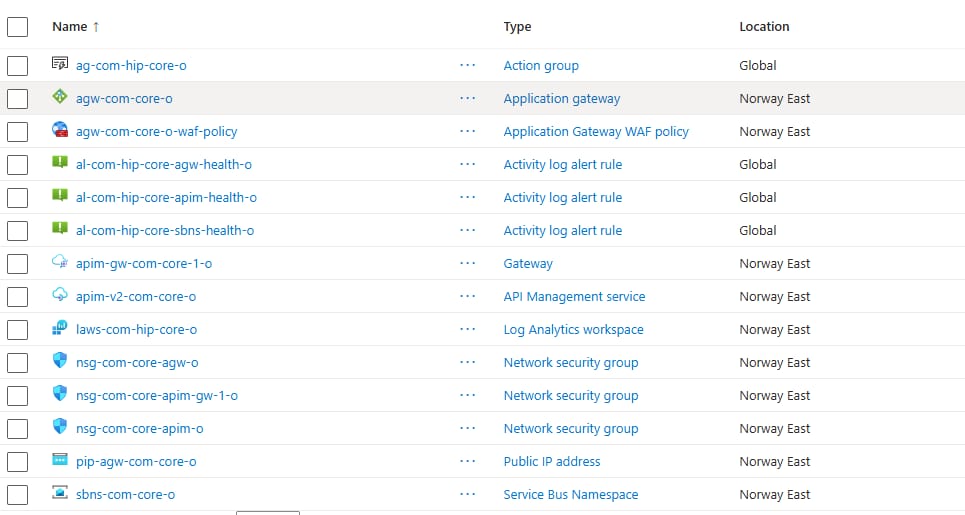
The resources that get deployed:
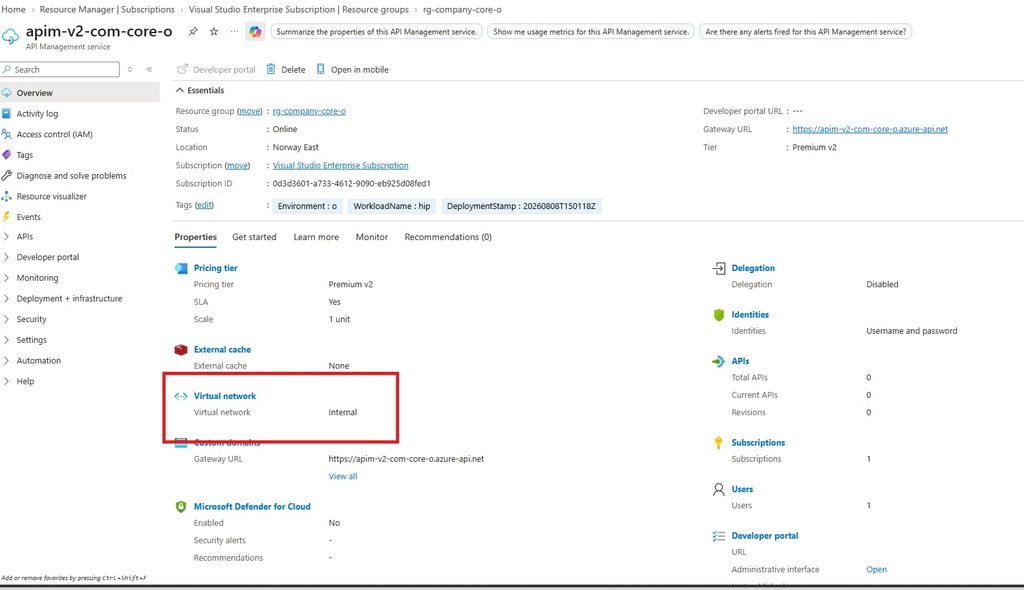
APIM in internal mode:
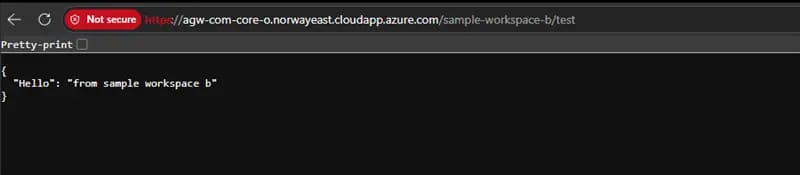
Leveraging the gateway to reach a mock API in a workspace behind an isolated workspace gateway:
Back to Part 1: VNet injection, workspaces & the workspace gateway
Leave a Reply